My Thoughts on Flash

Flash versus HTML 5Adobe made the right move regarding Flash for mobile browsers.  When I first saw flash on mobile, I knew something was wrong.  It wasn’t fast.  It wasn’t… right.
Our future work with Flash on mobile devices will be focused on enabling Flash developers to package native apps with Adobe AIR for all the major app stores.

When I developed NoteSync in AIR, I had the option to port the code to AIR for mobile, but I didn’t.  I decided it needed to be written from scratch in Java for Android. It was the right choice.  You have to make a native app for mobile to provide the best user experience. When you develop in flash and package it for native, it just isn’t as fast.  My guess is in a year or two Adobe will stop continuing support for their native app packager. Continue reading

Aspire – Poster & T-Shirt Creator

Aspire - Product Designer

Aspire – Product Designer

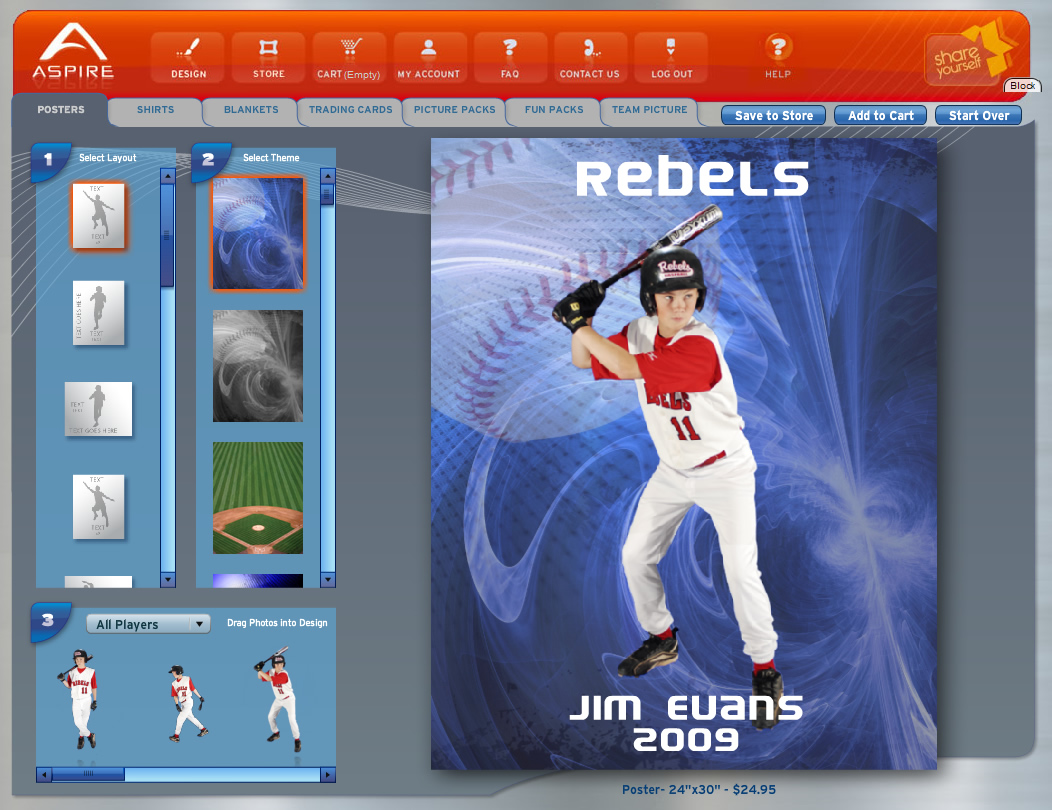
Aspire has revolutionized the way youth sporting pictures are taken.  Providing a green screen allows the players and the parents to design their own posters, shirts, and even trading cards.  At Rain I was the primary Flex developer for Aspire’s product designer.  The designer allows users to design custom posters, shirts, trading cards, team pictures, blankets, and other products to sell online through https://www.webdesign499.com/simple-ways-to-succeed-at-online-marketing/.

After being in beta since July 2008, we released the major release of Aspire in September, 2009.

Aspire’s business model is unique.  Aspire does a photo shoot, uploads the green screen photos, autogenerates all products for each player, and then sends the player an email letting them know their account is ready.  The user can then login and customize their own products.

Aspire was featured in an Adobe Max Keynote by RainInteractive ‘s Andrew Howlett (32 min). Keynote: http://bit.ly/BAmiI

“Trading cards are a top seller! Nowhere else on the planet can one design and order a trading card this way! We greatly appreciate the awesome tool you have created.” – Chris from Aspire

aspirePosterPreview

Aspire – Poster Designer


Calculating Image Resolutions in Flex

ImageWellWithPhoto

Photo Scaled 200% inside ImageWell. 50 dpi.

Custom book builders are great rich internet applications that we’ve made at Rain. One core component of custom book builders is allowing users to upload their own photos. The most common user error is uploading and using a photo that cannot be printed at a high quality print resolution. It is our job to let the user know if the image he or she has selected for a particular ImageWell (a rectangle where a photo can be placed) can be printed.

Basics of printing

Printers print according to dpi (dots per inch). Say a 1200 px x 1800 px image is printed onto a 4″ x 6″ sheet of paper. The dpi would then be:

  • width: 1200 px / 4 inches = 300 dpi
  • height: 1800 px / 6 inches = 300 dpi

Print resolutions can vary anywhere from 150 dpi (low/medium quality) to 300 dpi (high quality) and up.

Continue reading

Tour De Flex

tourDeFlex

Adobe just produced Tour De Flex an AIR app that allows you to tour all of Flex’s features.  Great for those who are curious about what flex can do.  For developers, this tool is great because it allows you to actually see the code to produce the feature that is shown.

Adobe states that Tour De Flex has three primary features:

  • Provide non-Flex developers with a good overview of what is possible in Flex in a “look and see” environment
  • Provide Flex developers with an illustrated reference tool
  • Provide commercial and non-commercial Flex developers a place to showcase their work

Check out the Tour De Flex Web Site

Adobe Chooses FXG Over SVG

In doing some research on filters in SVG I came across some new information regarding SVG. The reason that they have upgraded/changed focus for the SVG format to FXG was triggered when developing Thermo. They started using SVG and then they realized how difficult (and eventually deemed impossible) it was to easily translate SVG to Flash smoothly. So they developed FXG for Thermo & Flex 4 to replace SVG. Now we can just use FXG’s DropShadowFilter instead of copying the bitmap, offsetting it, applying a color fliter, blurring it, and then blending it.

What is FXG?
“FXG 1.0 describes an XML-based graphics interchange format for the Flash Platform. FXG contains high-level graphical and text primitives that can be used to create, group, transform and visually modify basic vector and bitmap shapes. The FXG rendering model follows very closely the Flash Player 10 rendering model and exposes all graphics capabilities of the Flash platform as well as offering expandable support to accommodate future capabilities of the Flash Player. The specification below dives into the technical details governing every element of FXG 1.0.”

FXG Specification:
FXG Specification Link

Blog Posts:
Mike Chamber Blog Post – Why Adobe Chose FXG Over SVG

Mark Ander’s Blog Post – Flash On The Beach – FXG & SVG

How to start playing with FXG:

  1. Get Flex Builder 4 source and use it in Flex Builder 3: Download Nightly Build
  2. How to

Finally a file format that Adobe can share across its programs that can easily be written and displayed.

Update 13-Oct-2008 – I originally stated that Adobe was no longer continuing SVG support, when really they are discontinuing support for the Adobe SVG viewer.  This article can be found here: Adobe Discontinues Support for SVG Viewer

Adobe Student Rep for Rich Internet Applications

Adobe Student Rep for RIA

Adobe Student Rep for RIA

Yesterday I was welcomed as an Adobe Student Rep for Rich Internet Applications. I am excited to get the Flex community going at BYU and educating other students about what Adobe Flex is and what an RIA is. Since I do this for work, I find it is easy to share my passion and my love for it with others.

I created a user group for BYU students. If you are a BYU student, join the group and enjoy the perks of being a member. You do not need to be an active Flex developer to join, you just need to be interested in what Flex is. I will be hosting an event this semester to get things kicked off.

Flex 2 Adobe Certified Professional Prep

Today I paid the $150 and took the Flex 2 certification test. I passed and am now an ACP – Adobe Certified Professional (add that to my Flash MX 2004 Certified Developer, MCP (Microsoft Certified Professional) and MOUS (Microsoft Office User Specialist) certifications).

Overall I found the test to be challenging. I wouldn’t take it without sufficient preparation. Here are my Flex 2 study preparation tips:

  1. Attest – provides practice tests and quizzes. Some questions on the official test came from the questions found on these practice tests.
  2. Lynda Free 7 Day Trial
  3. Flex 2 Advanced: Using Data Services – a must because the average flex developer hasn’t used RemoteObjects or WebServices very much and the test is roughly 30% on these topics.
  4. Flex 2 Beyond the Basics – great review of advanced flex topics.
  5. Flex 2 Essential Training – great review of basic flex topics.

Obviously use the flex documentation as a reference over concepts that you are unfamiliar with.

Topics founds on the test that I rarely used include: IViewCursor, Flex Data Services.

Good luck.

Flex / Flash Font Size Limit 127

Today at work we rediscovered the Flash / Flex font size limit of 127px.

We are creating an RIA that needs the ability to scale down a large SVG to a web editor and then scale it back out for a print-ready SVG. Flex would take a 300 px font, convert it to a 127 px font, and then scale it down. This caused our textfields to be very small and inconsistent.

Flex 3 – How to load a complied css swf

When attempting to load external compiled css swfs that have an embedded font into my flex application I was getting this error: Unable to load style(SWF is not a loadable module). This is reported as an official bug on adobe’s site at: Enable Local App to load RunTime CSS.swf from Server

To solve this, you require two things.

  1. Crossdomain Policy
  2. Local Apache Web Server

Regardless if this is a bug, the host server still needs a crossdomain policy at the root of the domain. Here’s an example crossdomain.xml policy.

The next problem is that you cannot load external compiled swfs from a
document root (c:/my documents/flex projects/myProject/myProject.html) until the bug is fixed.

PC Users:
What I did is installed easyphp. Next, I set up an alias in easyphp. Right click on the ‘easyphp’ icon in the taskbar -> administration. I set the alias to my bin folder of my project so that when I access the url http://127.0.0.1/myProject/myProject.html it loads up my bin directory. Also in my debug settings in flex I set the default debug and run path to launch as http://127.0.0.1/myProject/myProject.html.

Now my css/style swfs are loading great remotely. The only downside is having to run easyphp on top of everything just to load in my external compiled font swfs.

Mac Users:
Thanks to Bryce Barrand

  • go to system preferences
  • click on sharing
  • click on “web sharing” (this will turn on the automatically installed version of apache)
  • edit apache’s httpd.conf file (should be found at disk/private/etc/apache2/httpd.conf)
  • Find the line that says /Directory>
  • Just after that, add an Alias for each project that you want to test such as this:

    Alias /nameOfAlias /pathToYourFlexBinFolder

  • Set your directory node attribute to “/pathToYourFlexBinFolder”. Set the directory node value to:

    Options Indexes FollowSymLinks MultiViews
    AllowOverride None
    Order allow,deny
    Allow from all

  • Restart the webserver by unchecking and rechecking the “web sharing” checkbox

should be good to go after this. you can see the results by going to http://localhost/nameOfAlias in your browser